Contributors


Distribute your music

Growing your music career means basing marketing and promotional decisions on more than just gut feeling.
You need data, and plenty of it, to make informed choices about how, where and when to promote your music - otherwise you’re shouting into the void and keeping your fingers crossed that something works.
Thankfully, Spotify gives you a treasure trove of data to dive into to help you grow your music. In this guide, we’ll walk you through the data you can find in Spotify for Artists and how you can use the data in your accounts to plan your release strategies.
Obviously, the primary thing you’ll likely be checking in your Spotify for Artists platforms is probably your stream counts. Because, if you’re serious about making a living from your music, the number of streams your music gets matters - the more streams, the more income.
But besides raw streaming data, your audience data helps you to answer more questions: who is listening to your music? How are they engaging with you? Are they saving your tracks to their Library, or listening in editorial or third-party playlists? Are they discovering you from playlists or their algorithm? Are they based in a city you played a show at last week, or somewhere you’ve never heard of?
Knowing who listens to your music matters even more than knowing how many streams you’re getting. If you can figure out the kinds of people who enjoy listening to your music, you can build marketing campaigns and promotional strategies that appeal to the kinds of people you know will like your music.
If you’re not already using Spotify for Artists, this is your sign. It’s a treasure trove of data that helps you to understand how your music is performing, who is engaging with it, and how can you can improve performance for future releases.
It’s free to access, free to sign up for, free to use - so you’ve literally got nothing to lose. If you’ve not already claimed your Spotify for Artists account, you can do so here.
Once you’re signed up and have access to your artist profile(s), you’ll be able to see past data across your entire catalogue (regardless of whether some or all of your releases are across multiple independent label accounts), demographic insights into your listeners, and see which playlists are driving your Spotify streams.
Spotify gathers data on your listeners, covering age, gender and location, as well as insights into their level of engagement with your music. Just like other analytics platforms, this data will never be 100% accurate due to the nature of user privacy settings, but it does give you a good overview of the sorts of people who are enjoying and engaging with your music.
In the Audience tab in Spotify for Artists, you’ll be able to see a few different categories, which we'll dive into now.
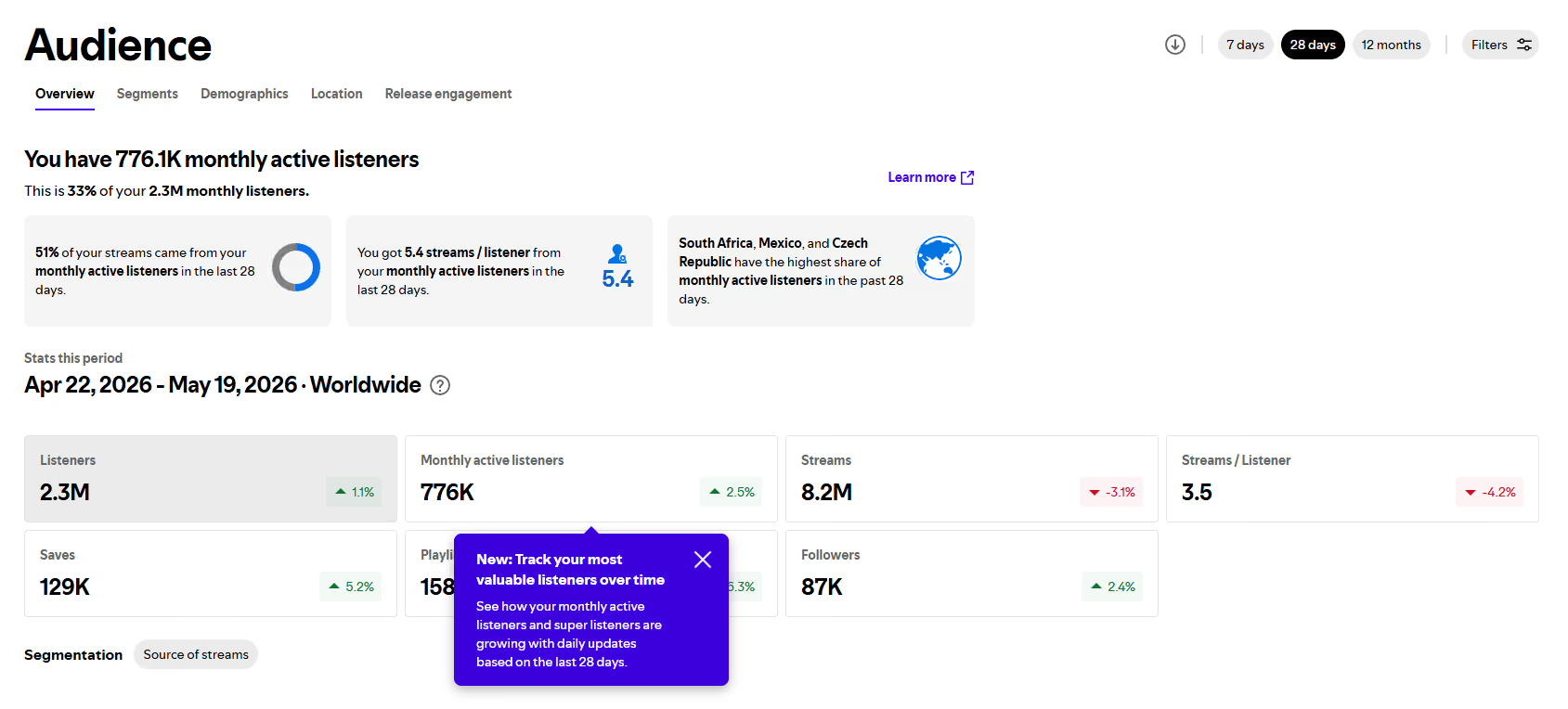
This shows you headline stats about your audience, which you can view over 7 days, 28 days or 12 months (or a custom date range). The stats shown are:
You can apply filters to the data, so you could, for example, narrow your view to show only listeners from a particular country - which is helpful specifically if you’re planning a tour or trying to launch your music career into a new country.
Within some categories of statistics, you can also filter by Source of Streams. For example, if you click into Listeners or Streams, you’ll see a graph below that shows you how your numbers have changed over the selected time period. You can then click ‘Source of streams’ to filter to:
This is particularly useful if you’re trying to identify reasons for a drop or growth in your streaming numbers. You may find that you see an increase in Programmed Sources streams if, for example, you opt your catalogue into Discovery Mode.
This is one of the most under-utilised areas in Spotify for Artists - so make sure you’re checking it regularly!
In the Segments section, you can see your Total Audience over the last 2 years and, most importantly, which segments those people fall into. Spotify breaks down Audience into three segments:
In the Segments section you can also see Reactivated Listeners (Previously Active Listeners who’ve returned to being Active Listeners in the last 28 days), new Active Listeners, and overall new Listeners.
If you’re seeing the bulk of your audience falling into the Programmed Listeners segment, it might be worth considering how to build deeper engagement with your listeners. While streams from algorithmic sources are valuable if you’re growing your music career, theyr’e never guaranteed. Algorithmic sources leave your streams at the discretion of the algorithm, meaning you have very little control over whether those listeners continue to get exposed to your music. Encourage listeners to pre-save your upcoming releases to increase the likelihood of those Programmed Listeners becoming Active Listeners!

The Demographics tab in your Audience on Spotify for Artists gives you insight into the gender and age of your listeners. You can filter by location, as before, or see your total audience over the last 28 days broken down by:
While it’s always wise to take demographic data with a pinch of salt, because online privacy settings can skew its accuracy, these stats will help you to build a clearer picture of who listens to your music - so that you can better target your social media content, advertising, or other promotional tactics to appeal to the right kinds of people.

In your Location tab, you can see a breakdown of your audience by either Country or City. In your Countries breakdown, you can also see what proportion of listeners in that Country are Active listeners.
These Location statistics are particularly useful if you’re planning a tour, so you can plan visits to cities where your fans actually are, or if you’re trying to identify new territories to break into - the ‘Show countries with less than 1% listeners’ is particularly helpful here in identifying countries where your audience is especially small.

In the final Audience tab in your Spotify for Artists account, you’ll find Release Engagement. By using the dropdown on the right hand side of this section, you can choose a recent release to see the data for.
Release Engagement shows you the proportion of your monthly active listeners who streamed your release in the first 28 days (or however many days it has been since release).
By default, this statistic only counts intentional streams, i.e. people who sought out your new release rather than finding it in an algorithmic setting, like Discover Weekly. However, you can filter to show all sources by using the Sources dropdown.
This statistic is another opportunity to establish whether your monthly listeners are actually engaging with your new releases. If you find that only a small percentage of monthly listeners are streaming new releases in the first 28 days, it suggests that there could be more promotional effort needed to make your fans aware of new releases.